Why this step matters
The GSTR-2B reconciliation tells you which supplier invoices match your books. It does not tell you where each result goes in GSTR-3B. That second step is where most input tax credit (ITC) errors happen: credit claimed gross and never reversed, blocked credit shown in the wrong row, reversals that cannot be reclaimed later because they went into 4B(1) instead of 4B(2), or reverse charge credit claimed without the tax being paid.
This guide takes each type of credit and each reconciliation result and shows the row of Table 4 of GSTR-3B it belongs in.
The structure of Table 4
Table 4 has four parts. Part A is the credit available, Part B is what you reverse, Part C is the net credit that reaches your electronic credit ledger, and Part D is information only.
| Row | What goes here | Where the figure comes from |
|---|---|---|
| 4A(1) Import of goods | IGST paid on imports, including from SEZs | Auto-filled from GSTR-2B (ICEGATE data) |
| 4A(2) Import of services | IGST paid under reverse charge on services from abroad | Your own figure; not in GSTR-2B |
| 4A(3) Inward supplies liable to reverse charge | RCM credit on domestic purchases, other than 4A(1) and 4A(2) | Auto-filled for registered suppliers; add RCM on purchases from unregistered persons yourself |
| 4A(4) Inward supplies from ISD | Credit distributed to you by your Input Service Distributor | Auto-filled from GSTR-2B, net of ISD credit notes |
| 4A(5) All other ITC | Credit on B2B invoices and debit notes, net of credit notes, plus credit you reclaim | Auto-filled from GSTR-2B; add reclaims yourself |
| 4B(1) Reversal: permanent | Rules 38, 42 and 43, and Section 17(5) | Your own computation |
| 4B(2) Reversal: others | Reversals you may reclaim later, such as Rule 37 and Rule 37A | Your own computation |
| 4C Net ITC available | 4A minus 4B | Calculated by the portal |
| 4D(1) ITC reclaimed | Credit reversed earlier in 4B(2) and reclaimed this month | Your own figure, for information |
| 4D(2) Ineligible ITC | Credit barred by Section 16(4) or restricted by place-of-supply rules | Auto-filled from GSTR-2B |
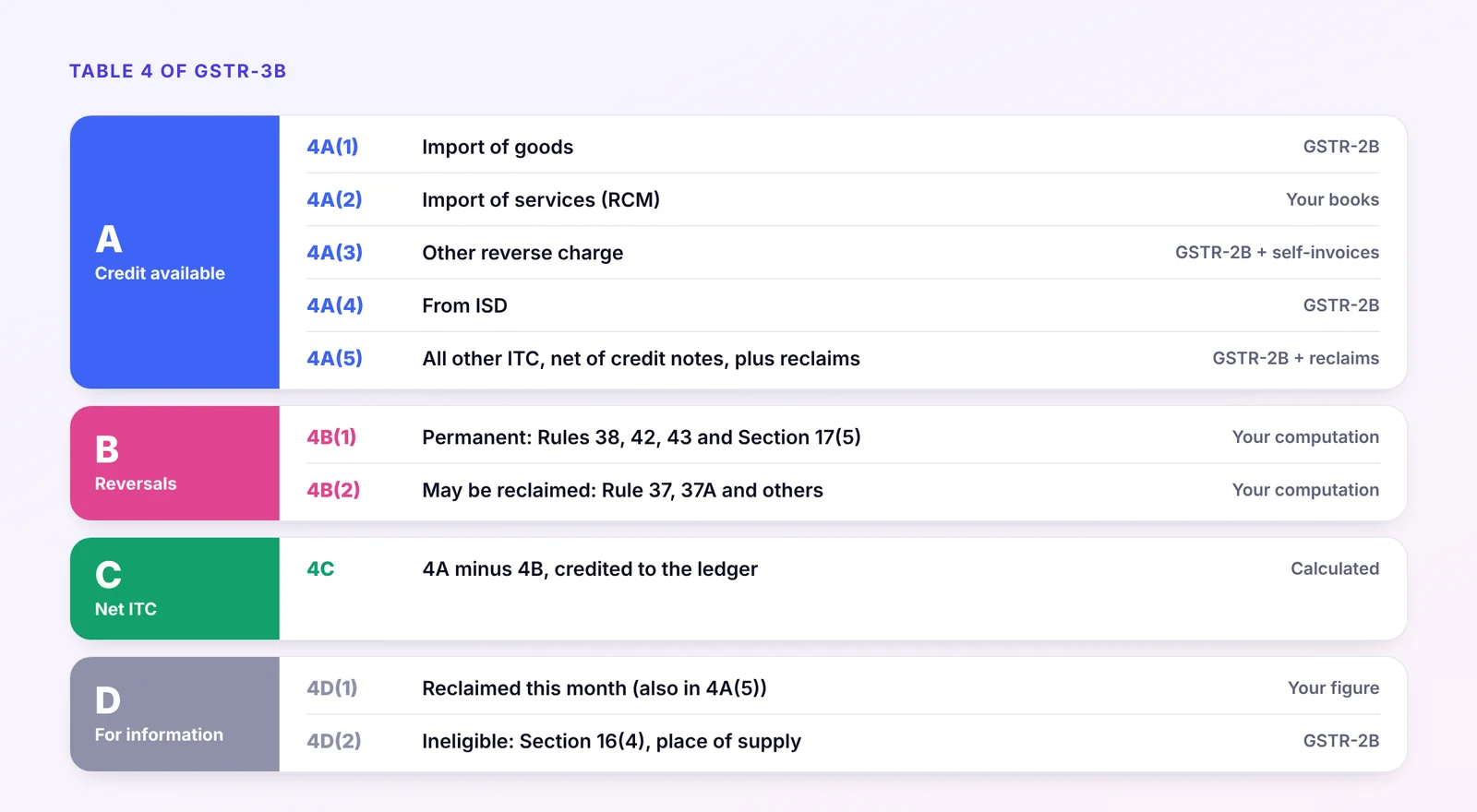
The figures auto-filled from GSTR-2B can still be edited. Over-claiming against GSTR-2B is caught after filing through an intimation in Form DRC-01C (Rule 88D), which you must answer by paying the excess or explaining the difference.
How GSTR-2B feeds Table 4
GSTR-2B is generated on the 14th of the following month, after you have acted on supplier records in the Invoice Management System (IMS). Each section maps to a row, as set out in the GSTR-2B FAQs on the GST portal:
- B2B invoices and debit notes from registered suppliers go to 4A(5).
- Credit notes from suppliers are netted off in the same row. Since the January 2023 return period they reduce 4A(5) rather than appearing as a reversal in 4B(2), so 4A(5) can occasionally be negative.
- ISD invoices go to 4A(4), net of ISD credit notes.
- Imports of goods (including from SEZs) go to 4A(1).
- Reverse charge supplies reported by registered suppliers go to 3.1(d) as tax payable and to 4A(3) as credit.
- ITC not available, because the Section 16(4) time limit has passed or the place-of-supply rules restrict it, goes to 4D(2), not to 4A.
Imports of services are never in GSTR-2B. You report the tax in 3.1(d) and the credit in 4A(2) from your own records.
From reconciliation result to GSTR-3B row
Every line of your reconciliation should end with a decision about where it goes. The common cases:
| Reconciliation result | What to do in IMS | Where it goes in GSTR-3B |
|---|---|---|
| Matched and eligible | Accept | 4A, as auto-filled |
| Matched, but blocked under Section 17(5) (motor vehicles, food, club membership, works contract for immovable property and so on) | Accept | Claim in 4A(5), reverse in 4B(1) |
| Matched, used partly for exempt supplies or non-business purposes | Accept | Claim in 4A(5), reverse the Rule 42 or Rule 43 share in 4B(1) |
| In GSTR-2B, not in your books | Reject if not yours; keep pending if goods or services not yet received | Not claimed. If you forget to act, the record is deemed accepted and auto-filled, so reverse it in 4B(2) until it is resolved |
| In your books, not in GSTR-2B | Nothing to act on yet | Do not claim. Claim in 4A(5) in the month it appears in GSTR-2B, within the Section 16(4) time limit |
| Value in GSTR-2B lower than your books | Accept, ask the supplier to amend | Claim only the GSTR-2B value. The difference waits for the amendment |
| Value in GSTR-2B higher than your books | Ask the supplier to correct before GSTR-3B is filed. If you must accept, adjust | Reverse the excess in 4B(2) so it can be reclaimed if the higher value proves correct |
| Supplier not paid within 180 days (Rule 37) | No IMS action | Reverse in 4B(2); reclaim in 4A(5) and 4D(1) once you pay |
| Supplier has not filed GSTR-3B for the invoice by 30 September after the year end (Rule 37A) | No IMS action | Reverse in 4B(2) by 30 November; reclaim in 4A(5) and 4D(1) when the supplier files and pays |
| Time-barred under Section 16(4) or place-of-supply mismatch | No action needed | Shown in 4D(2), not claimed |
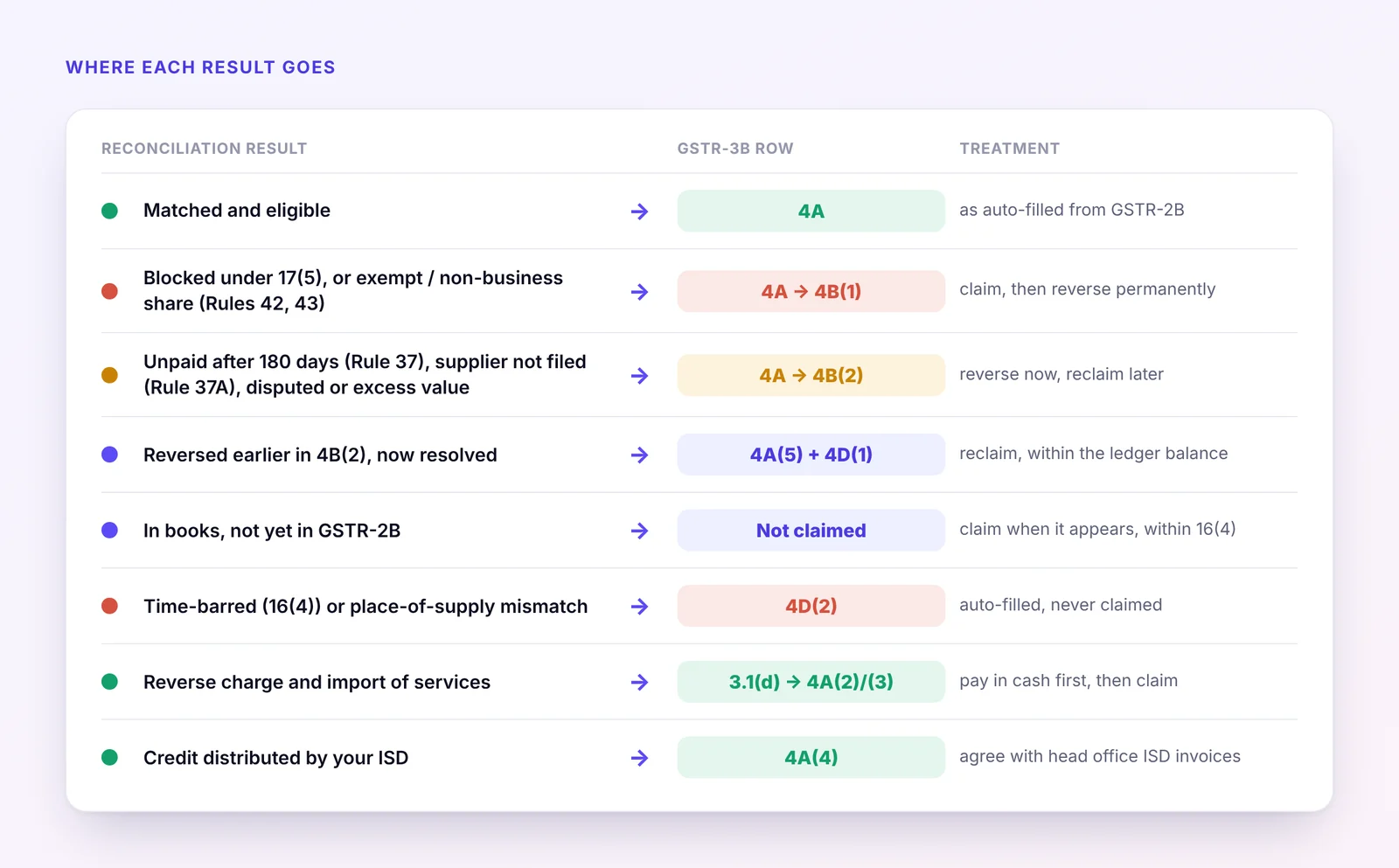
The 4B(1) or 4B(2) question Ask whether the credit could come back. If it can never be claimed, because the law blocks it or it relates to exempt or non-business use, the reversal goes in 4B(1). If it might be claimed later, once you pay the supplier, the supplier files its return or an invoice is corrected, it goes in 4B(2). Only 4B(2) reversals can be reclaimed through 4D(1).
Reversals in 4B(1): permanent
These reversals are final. The credit does not return.
- Section 17(5): blocked credits. Examples include motor vehicles for passenger transport (with exceptions), food and beverages, outdoor catering, beauty treatment, health services, club and fitness memberships, travel benefits for employees, works contract services and goods or services used to construct immovable property on your own account, and goods lost, stolen, destroyed, written off or given as free samples or gifts. Under Circular 170/02/2022, these are claimed in 4A as auto-filled and reversed in 4B(1). They are not shown in 4D(2).
- Rule 42 (inputs and input services) and Rule 43 (capital goods). Where credit is used partly for exempt supplies or for non-business purposes, the common credit is apportioned and the exempt or non-business share reversed each month. The annual recalculation is done by the September return of the following year, with any further reversal also in 4B(1).
- Rule 38. Banking companies and financial institutions that opt for the 50% restriction report the lapsing half here.
Reversals in 4B(2): may be reclaimed
These reversals are tracked in the Electronic Credit Reversal and Re-claimed Statement (ECRRS) on the portal, which works as a ledger of credit you can still reclaim.
- Rule 37: payment not made within 180 days. If you have not paid the supplier the value and tax within 180 days of the invoice date, reverse the credit in the return for the following period, with interest. Reclaim it once you pay.
- Rule 37A: supplier has not paid the tax. If an invoice appeared in your GSTR-2B but the supplier has not filed its GSTR-3B for that period by 30 September of the following year, reverse the credit by 30 November. Reversing after that date attracts interest. Reclaim it once the supplier files and pays.
- Section 16(2)(b) and (c). Goods or services not received, or tax not paid to the government by the supplier.
- Deemed-accepted records you dispute. Invoices you did not act on in IMS that are not yours or not yet received.
- Credit claimed in error in an earlier month that may be reclaimed once corrected.
Reclaiming credit: 4A(5) and 4D(1)
When a 4B(2) reversal can be reclaimed, the amount is reported twice:
- In 4A(5), so that it adds to your net credit in 4C.
- In 4D(1), so that the portal can match the reclaim against the reversal.
Since GSTN's advisory of 29 December 2025, the portal checks the reclaim. The amount in 4D(1) cannot exceed the closing balance of your ITC reclaim ledger plus the amount reversed in 4B(2) in the same return. If it does, GSTR-3B cannot be filed. If your reclaim ledger has an opening balance from before the statement was introduced, declare it on the portal so that genuine reclaims are not blocked.
Reverse charge: 3.1(d), 4A(2) and 4A(3)
Reverse charge credit is only available once the tax has been paid, and it must be paid in cash.
- Domestic RCM from registered suppliers, such as goods transport agencies, legal services or security services, appears in GSTR-2B. Report the tax in 3.1(d) and claim the credit in 4A(3).
- Domestic RCM on purchases from unregistered persons. Raise a self-invoice, report the tax in 3.1(d) and the credit in 4A(3). These do not come through GSTR-2B. GSTN is testing a facility to e-invoice these self-invoices.
- Import of services. Report the IGST in 3.1(d) and the credit in 4A(2).
The same December 2025 advisory introduced a matching check for reverse charge: credit claimed in 4A(2) and 4A(3) cannot exceed the RCM tax paid in 3.1(d) for the period plus the balance in your RCM liability and ITC statement. Pay first, then claim.
ISD credit: 4A(4)
From 1 April 2025, a business with more than one GSTIN under the same PAN must distribute the credit on common input services received from third parties through an Input Service Distributor (ISD) registration. Cross-charging these services between branches is no longer the route for such third-party services.
The ISD files GSTR-6 each month and issues ISD invoices to each unit, usually in proportion to turnover. The credit then appears in each unit's GSTR-2B and is claimed in 4A(4). ISD credit notes reduce the same row. For the receiving unit, the reconciliation is simple: what is in 4A(4) should match the ISD invoices your head office says it distributed. Any difference points to a mistake in the ISD's GSTR-6.
A worked example
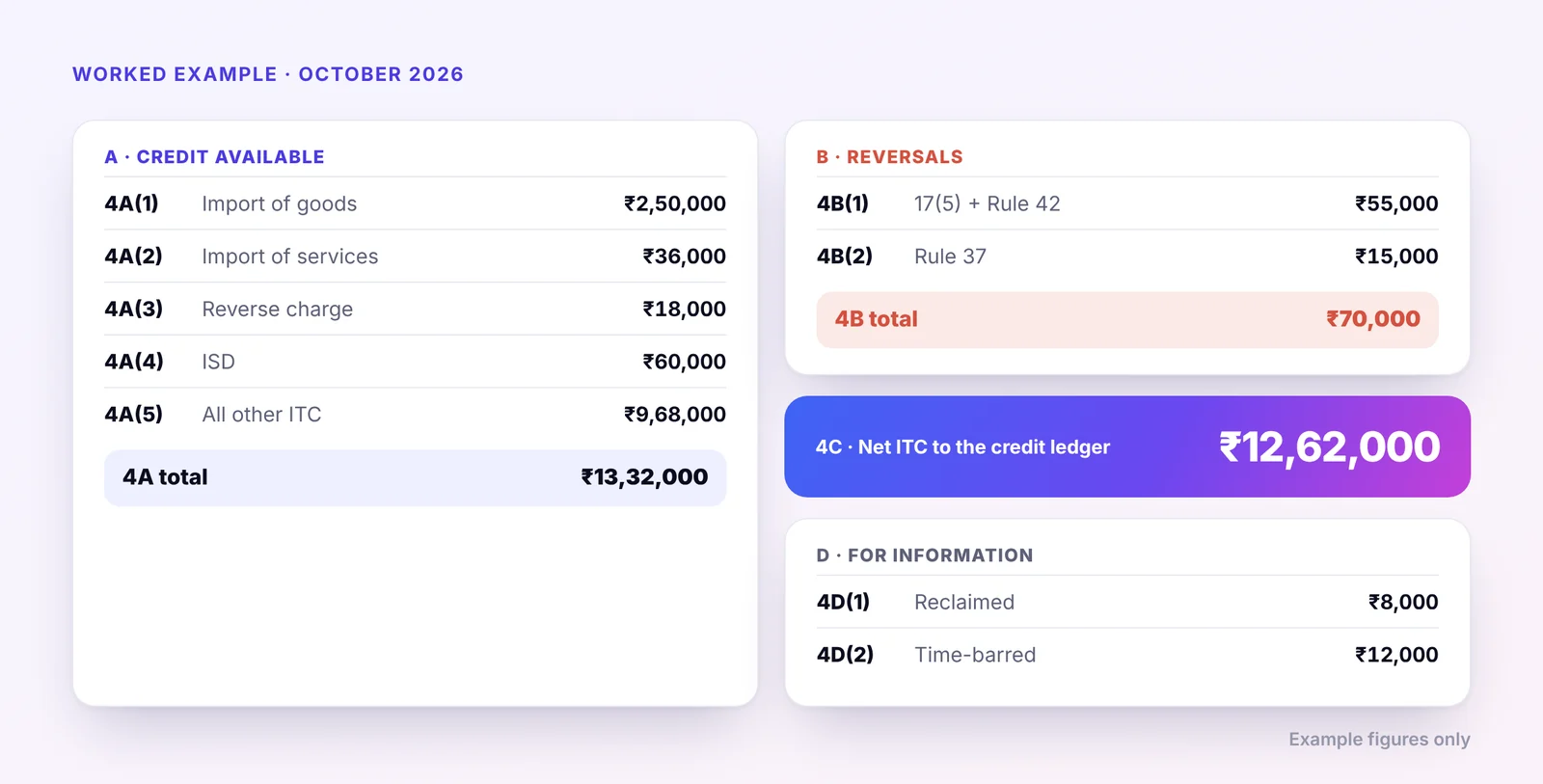
A manufacturer files GSTR-3B for October 2026. Figures are total ITC across IGST, CGST and SGST for simplicity. In the actual return each tax head is reported separately.
| Item | Amount (₹) |
|---|---|
| B2B invoices in GSTR-2B | 10,00,000 |
| Credit notes in GSTR-2B | 40,000 |
| ISD credit in GSTR-2B | 60,000 |
| IGST on imports of goods in GSTR-2B | 2,50,000 |
| RCM on freight from a registered GTA (paid in cash) | 18,000 |
| RCM on import of software services (paid in cash) | 36,000 |
| Included above: blocked credit on staff canteen and a passenger car | 25,000 |
| Rule 42 reversal for exempt supplies | 30,000 |
| Invoices unpaid beyond 180 days (Rule 37) | 15,000 |
| Earlier Rule 37 reversal, now paid and reclaimed | 8,000 |
| Time-barred credit shown as not available in GSTR-2B | 12,000 |
| Invoices in the books, not yet in GSTR-2B | 45,000 |
How the return is filled:
| Row | Working | Amount (₹) |
|---|---|---|
| 4A(1) | Imports of goods | 2,50,000 |
| 4A(2) | Import of services under RCM | 36,000 |
| 4A(3) | RCM on GTA freight | 18,000 |
| 4A(4) | ISD credit | 60,000 |
| 4A(5) | 10,00,000 − 40,000 + 8,000 reclaimed | 9,68,000 |
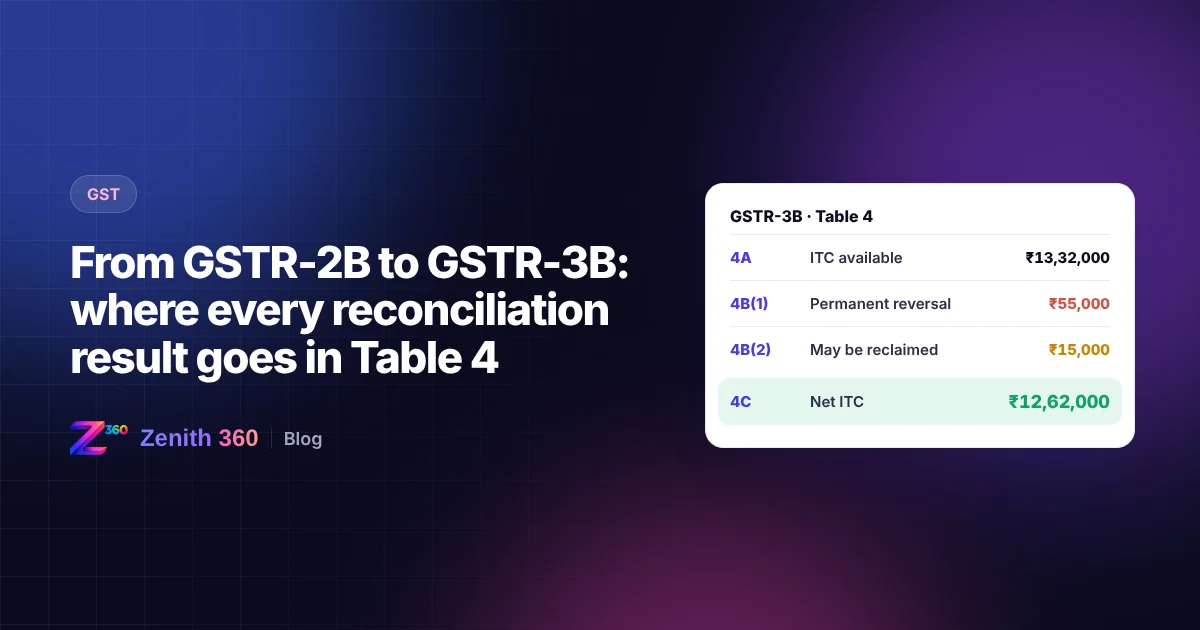
| 4A total | 13,32,000 | |
| 4B(1) | 25,000 blocked + 30,000 Rule 42 | 55,000 |
| 4B(2) | Rule 37 | 15,000 |
| 4C net ITC | 13,32,000 − 70,000 | 12,62,000 |
| 4D(1) | Reclaimed, also included in 4A(5) | 8,000 |
| 4D(2) | Time-barred | 12,000 |
The ₹45,000 of invoices not yet in GSTR-2B is not claimed this month. It is carried forward on the pending list and claimed in the month it appears. The RCM tax of ₹54,000 is shown in 3.1(d) and paid in cash before the credit in 4A(2) and 4A(3) can be used.
Dates to keep in mind
- 14th of the following month: GSTR-2B is generated from your IMS actions. You can change IMS actions and recompute GSTR-2B until GSTR-3B is filed.
- 20th (monthly filers): GSTR-3B due date.
- 30 September after the year end: the date a supplier must have filed its GSTR-3B to avoid a Rule 37A reversal in your books.
- 30 November after the year end, or the date you file the annual return if earlier: the last date to claim credit for the year under Section 16(4), and the date by which Rule 37A reversals should be made. For 2025-26, that date is 30 November 2026.
A monthly checklist
- Finish the GSTR-2B reconciliation and IMS actions before the 14th, and recompute GSTR-2B if you act after it
- Separate matched credit into eligible, Section 17(5) and Rule 42 or 43 shares
- List invoices unpaid beyond 180 days, and invoices now paid that were reversed earlier
- Check the reclaim ledger balance before entering anything in 4D(1)
- Pay reverse charge tax in 3.1(d) before claiming it in 4A(2) and 4A(3)
- Agree 4A(4) with the ISD invoices from your head office
- Keep a working paper that ties every figure in Table 4 back to the reconciliation
Official sources and further reading
- Circular No. 170/02/2022-GST: CBIC's clarification on reporting ITC and reversals in Table 4
- GSTR-2B FAQs: GST portal help on how each GSTR-2B section maps to GSTR-3B
- Advisory and FAQs on the Electronic Credit Reversal and Re-claimed Statement and RCM statement: GSTN, 29 December 2025
- FAQs on the Invoice Management System: GSTN
- GST portal: returns, IMS and the latest advisories under News and Updates
- Rule 37A explained: ClearTax
- Mandatory ISD from April 2025: Taxscan
How Zenith360 GST helps
Everything in this guide is a monthly routine, and most of it is mechanical: matching, sorting, tracking and adding up. Zenith360 GST does that work from your own purchase data, so your team spends its time on the judgement calls.
| Step | Done by hand | With Zenith360 GST |
|---|---|---|
| Reconciliation | Purchase register and GSTR-2B matched in Excel, invoice numbers cleaned line by line | Purchase data matched with GSTR-2B and IMS on GSTIN and cleaned invoice number, with a tolerance for rounding |
| IMS actions | Each supplier record reviewed on the portal | Suggested action for every record: accept, reject or keep pending, based on the match result |
| Classifying credit | Blocked and exempt-use credit picked out from memory | Each invoice tagged to its Table 4 row, with Section 17(5) items and Rule 42 or 43 shares flagged for review |
| Reversals and reclaims | A separate sheet for Rule 37 and Rule 37A items, often out of date | Unpaid invoices tracked against the 180-day limit, supplier filing status checked for Rule 37A, and every 4B(2) reversal held until it is reclaimed |
| Reclaim and RCM checks | Discovered when GSTR-3B fails to file | 4D(1) compared with the reclaim ledger, and RCM credit compared with RCM tax paid, before you file |
| Pending list | Carried forward by email | Invoices in your books but not yet in GSTR-2B carried forward, with supplier follow-ups and a warning before the Section 16(4) deadline |
| Table 4 working | Built in Excel, then typed into the portal | Table 4 prepared row by row, with a working paper that ties every figure back to the invoices behind it |
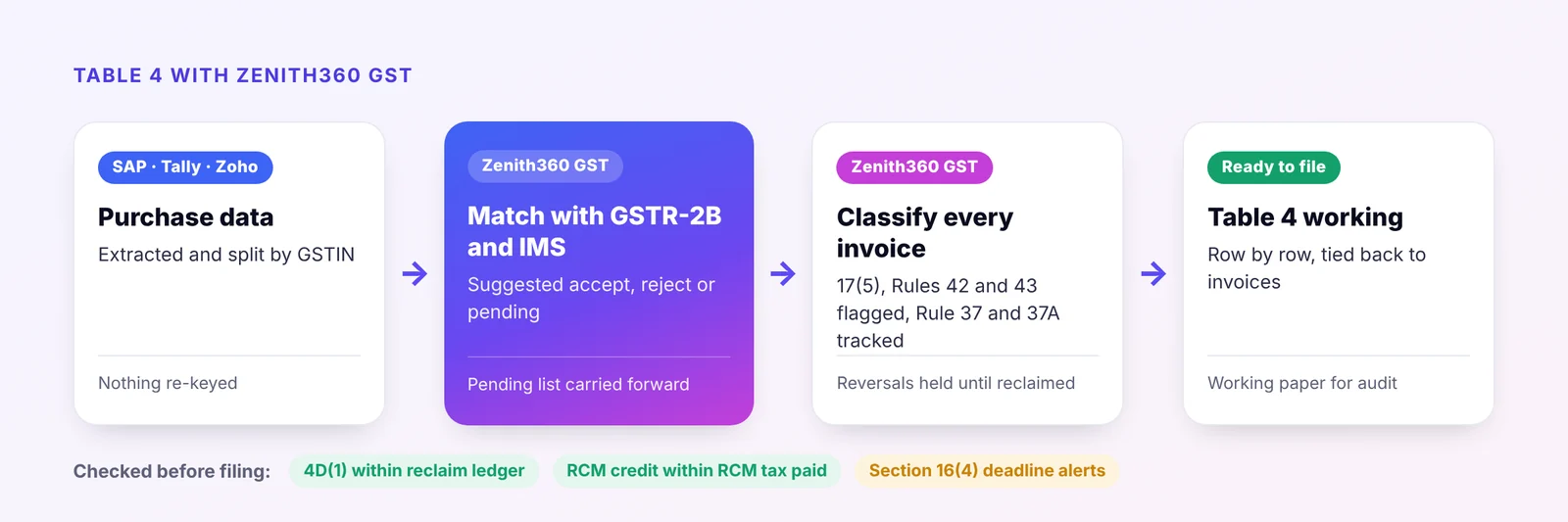
The result is a GSTR-3B you can explain line by line, whether the question comes from your auditor, a DRC-01C intimation or your own review.
If your purchases are recorded in SAP or Tally, Zenith 360 extracts the data, separates it by GSTIN and passes it to Zenith360 GST, so nothing is exported and re-keyed. See how we did this in our SAP GST data case study, or book a demo to see the reconciliation and Table 4 working on your own data.
This article is general information based on the law and portal behaviour as at the date of publishing. Rules and portal features change, so check the current position on the GST portal and in the law, or speak to your tax adviser, before acting.

Aniruddha has spent more than ten years in finance, tax and business systems for Indian companies, and founded Z360 Systems to automate the work finance teams still do by hand. More about Aniruddha